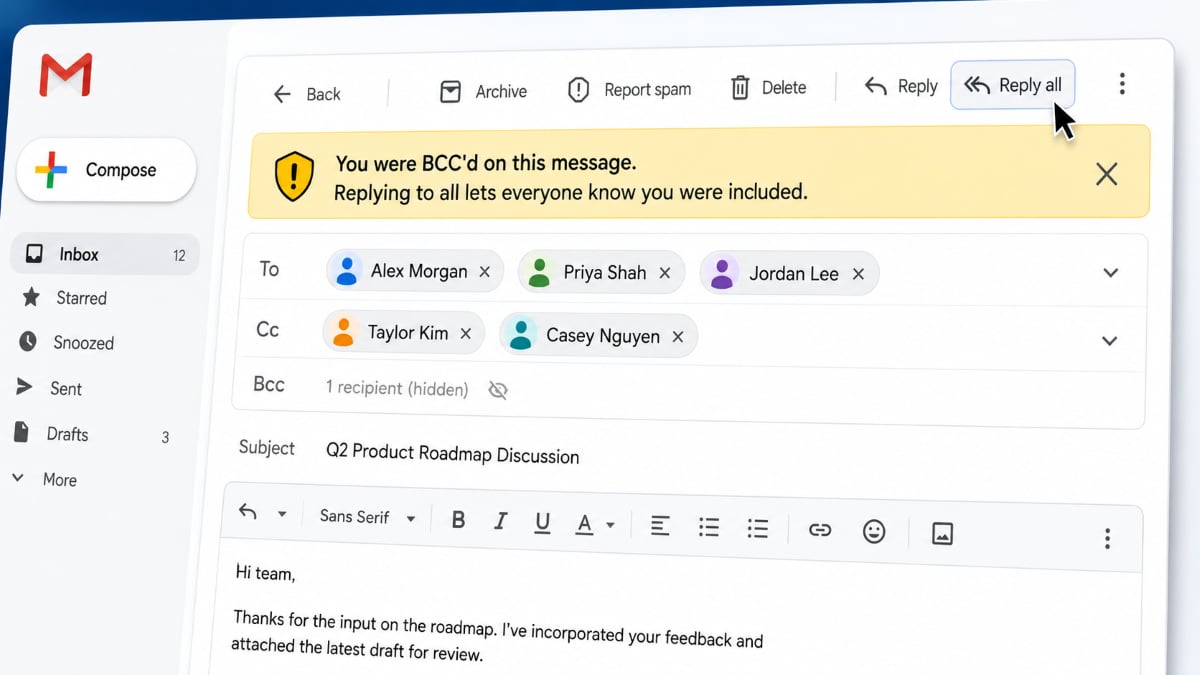
One careless click on Reply All can reveal more than you intended, including the fact that you were never meant to be visible on the thread.
Gmail now warns users when they select Reply All on an email where they were BCC’d. The alert appears before the message is sent, giving recipients a chance to avoid revealing both their involvement and email address to the rest of the thread.
For personal and business users, the extra pause could prevent an awkward privacy mistake, particularly in sensitive workplace conversations where someone was included discreetly.
Gmail adds a warning before the message goes out
Google said Gmail will display a prominent caution notice when a BCC recipient selects Reply All. The prompt appears before the message is sent and asks the user to confirm that they intend to reveal their participation in the thread.
The yellow banner reads: “You were BCC’d on this message. Replying to all lets everyone know you were included.”
Android Authority reported that sending the response would also expose the user’s email address to everyone copied on the original message. The warning does not prevent the reply, but it makes the privacy consequence clear before the user proceeds.
BCC, or blind carbon copy, allows someone to receive an email without appearing in the visible recipient list. Senders often use it when they want to include someone discreetly or keep a recipient’s identity private.
Why a BCC disclosure can matter at work
An accidental Reply All can reveal more than an address. It may show that a manager, human resources representative, legal adviser, client, or other stakeholder was privately included in a discussion.
In a workplace thread, the disclosure could expose an internal escalation, create confusion, or damage trust among participants. The impact may be greater when the conversation involves personnel matters, legal questions, customer complaints, or other sensitive topics.
The warning is especially useful for people who manage crowded inboxes or respond quickly to long email chains. Before sending, users should still review the To and CC fields and consider whether a direct reply to the sender would be safer.
The warning is enabled automatically
The feature is available by default and triggers whenever a BCC recipient attempts to use Reply All, according to Google. Administrators and individual users do not need to adjust any Gmail settings.
Google said the feature is available now for Rapid Release and Scheduled Release domains. It applies to all Google Workspace customers, Workspace Individual subscribers, and people using personal Google accounts.
Android Police noted that Gmail users on the web should see the warning after refreshing the service.
The update adds a useful pause, not a substitute for checking recipients. When privacy is the reason for using BCC, Gmail now makes that mistake harder to make.
Discover nine hidden Gmail features for scheduling, snoozing, filtering, AI writing, calendar events, and inbox shortcuts that can save you time.